


OpenSnow
4.11.25K Reviews
App Specs
- Version
- 7.4.0
- Updated On
- License
- Free
- Downloads
- 100,000+
- Developer
- Cloudnine Weather, Inc.
- Categories
- Weather
- Platform
- Android
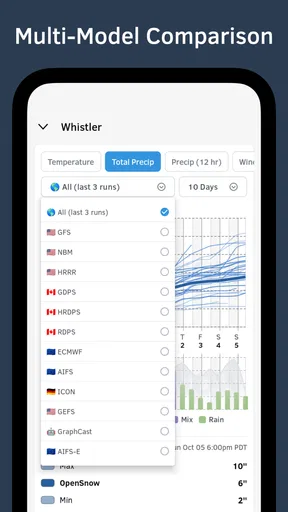
Screenshots
 Analysis by AppCompare
If I were deciding whether to pay for a snow-focused forecast, I’d start with a practical question: do I need mountain conditions to plan my week, or just a quick check of the weather outside? OpenSnow is built for the first kind of decision. It is a free weather app from Cloudnine Weather, Inc., with optional in-app purchases ranging from $5.99 to $49.99 per item. That gives you a way to try it before spending anything, but the price range alone doesn’t tell me which purchase suits a particular skier, so I’d judge the value by how often its snow information changes what I do.
Free to try, with paid options to weigh
The free starting point matters if you ski occasionally or are simply curious about conditions at a nearby resort. OpenSnow has an average rating of 3.9 from around 2,000 ratings, and more than 100,000 installs. Those figures suggest that it has found an audience, but they aren’t a substitute for checking whether its approach fits your plans. It is rated for everyone, and version 7.1.0 requires iOS 11 or later.
Optional purchases are the point where I’d pause and think about my own habits. The app offers some features without charge and places additional forecast and snow-report tools behind its premium option. I wouldn’t pay just because a longer forecast sounds reassuring: mountain weather can change, and a forecast is guidance rather than a promise. I’d first use the free access to see whether the locations and information I care about are useful enough to keep coming back.
What the mountain focus adds
Most general weather apps are handy for deciding whether to take a jacket or expect rain on the commute. OpenSnow’s appeal is narrower and more useful for people whose plans depend on snowfall and mountain conditions. The combination of location-specific forecasts, snow alerts, and mountain cameras can help answer a more practical question than “Will it be cold?”: is it worth driving up, and what might I find when I get there?
That focus is valuable when a small change in snowfall affects whether you take a day off, leave early, or choose one destination over another. A general forecast can remain the better everyday companion for errands and broad local weather, while OpenSnow makes more sense as a specialist check before a winter trip. I see the two as serving different jobs rather than one automatically replacing the other.
How I’d use it before a ski day
For a weekend outing, I’d save the places I actually consider visiting instead of filling the app with resorts I’m unlikely to reach. Then I’d compare the forecast and snowfall alerts across those choices, and check a camera before committing to the drive. That routine makes the information actionable: an alert can prompt me to look, but I’d still use the broader forecast and live view to decide whether conditions suit my group.
There’s also a useful distinction between planning and certainty. Historical snowfall information can add context when you’re comparing a season with past ones, but it shouldn’t be treated as a guarantee of what a particular day will be like. I’d use it to understand the bigger picture, then make the actual trip decision with the current forecast and camera view. That is a more sensible workflow than letting one number or notification make the choice for me.
Worth Reading Before You Choose

EA SPORTS FC Mobile 26 Is a Bigger Football Game, but It Takes Time

Flipboard Shows What News Apps Must Do Beyond the Feed

Switching to Android Auto Means Rethinking Your Driving Routine

Google Calendar Makes a Crowded Week Easier to Manage

Ludo King Makes the Most of the Minutes Between Plans

Baby Panda World Brings Quick Play to Modern Phones, but Its Game Library Feels Busy
Who is likely to get the most from it?
I’d recommend trying OpenSnow if you ski or snowboard often enough that forecasts influence your destination, timing, or whether you go at all. It is also useful for someone planning a winter trip who wants to keep several mountain locations in view. The app’s expert analysis can be a bonus for curious users who enjoy understanding the weather behind a forecast, not just glancing at a temperature.
On the other hand, if you rarely visit snowy areas, need a simple forecast for daily city life, or prefer one app that handles every kind of weather question, a general-purpose weather app may be a better fit. Likewise, anyone who expects a snow alert to guarantee fresh powder may find the experience frustrating. Alerts are prompts to check conditions, not a promise about what will be waiting on the mountain.
Why OpenSnow is a Must-Have for Skiers
The first thing that struck me about OpenSnow is its clean, straightforward interface. When you're gearing up for a day on the mountain, the last thing you want is to wrestle with a complicated app. Thankfully, this app delivers information quickly and clearly, keeping it simple yet highly informative.
Features That Stand Out
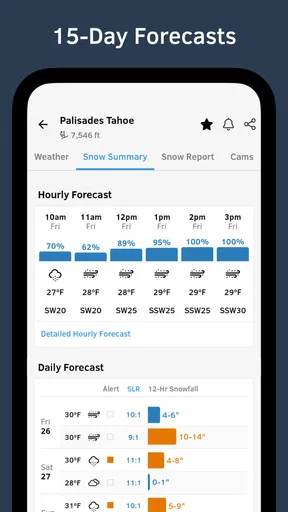
OpenSnow is packed with features that truly cater to winter sports enthusiasts. The app offers detailed weather forecasts for thousands of locations worldwide, so whether you're planning a trip to the Rockies or a local hill, you’ll get the info you need.
- Custom Forecasts: You can customize the app to receive forecasts tailored to your favorite locations. This means no more sifting through irrelevant information.
- Powder Alerts: Who doesn’t love fresh powder? OpenSnow allows you to set alerts for new snowfall so you can be the first to know when it’s time to hit the slopes.
- Live Cameras: Ever arrived at the mountain only to find less-than-ideal conditions? With live cameras, you can check the current conditions before you even leave your house.
These features make planning your next trip not only easier but also much more exciting. Knowing what to expect on the mountain can save you time and ensure you get the most out of your ski day.
In-Depth Analysis by Experts
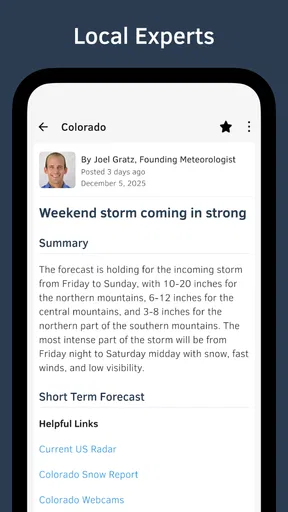
One of the most impressive aspects of OpenSnow is its team of weather professionals who provide expert analysis. These folks really know their stuff, offering detailed insights into weather patterns and what they mean for skiing conditions. Their ability to break down complex meteorological data into easy-to-understand forecasts is invaluable.
I found their blog posts particularly insightful. They often delve into topics like climate trends and how they’re impacting snowfall, which is fascinating for anyone interested in the science behind the weather.
Easy to Navigate
Navigation-wise, the app is a breeze. The main screen provides a quick overview of your selected locations, and tapping on any one of them brings up a detailed forecast. The menu is intuitive, making it easy to switch between locations, check alerts, and read the latest blog posts.
One handy feature is the ability to view historical snowfall data. It’s interesting to see how this season compares to previous ones, and it can be a fun way to predict future conditions.
Subscription Options
While OpenSnow is free to use, there is a premium version available, which unlocks additional features like 10-day forecasts and more detailed snow reports. For serious skiers and snowboarders, the subscription might be worth it.
The premium version also removes ads, which is a nice bonus if you’re someone who spends a lot of time on the app.
Final Thoughts
In conclusion, OpenSnow is a fantastic tool for anyone who loves skiing or snowboarding. Its user-friendly design, combined with expert insights and customizable features, makes it a standout in the world of weather apps. Whether you're a weekend warrior or a seasoned skier, this app is definitely worth a download.
Ready to give it a try? You can find OpenSnow on the App Store and Google Play, so you can start planning your next snow adventure today!
Small workflow choices that improve the experience
I wouldn’t treat every saved location as equally important. Keeping a short list of realistic alternatives makes comparisons faster and reduces the chance that an interesting forecast distracts me from the resort I can actually reach. If I’m deciding between a close hill and a longer drive, I’d check the closer option first, then use the second location only if its forecast gives me a concrete reason to change plans.
Alerts are most useful when they support a decision I have already defined. For example, I might want a notification when fresh snowfall makes a day trip worth reconsidering. I would still open the forecast before rearranging work or travel, because a snowfall alert alone cannot tell me whether the timing, overall weather, or visibility will suit my plans. That small habit makes notifications helpful rather than a source of needless urgency.
For a family outing or a mixed-ability group, I’d use the app to prepare a conversation, not to make the decision for everyone. A camera view and forecast can help set expectations before leaving, while each person’s comfort, travel time, and preferred terrain still matter. This is one place where a specialist snow app is useful but not sufficient: it informs the weather part of the plan, not every practical detail of a mountain day.
Where a specialist forecast has limits
OpenSnow’s focus is also its main trade-off. A dedicated snow app can be more relevant than a standard weather screen when snowfall is central to the plan, but it is not automatically the best tool for every outing. If I need broad day-to-day weather information unrelated to skiing, I’d keep using a general forecast app rather than expecting a mountain-oriented product to be my only weather reference.
I’d also avoid reading a forecast as a precise description of what I will experience at every point on a mountain. Weather varies with location and time, and a camera only shows the particular view available from that camera. I would use the app to narrow down choices and then stay flexible, especially when a long drive or a full day outdoors depends on the outcome.
Another trade-off is deciding whether premium access earns its place in my routine. A longer forecast can help with early planning, while detailed reports may matter more to someone choosing among mountain destinations. If I only check conditions once in a while, the free option may be enough; if I repeatedly use those additional tools to plan ski days, the purchase could feel more worthwhile. I’d make that call after seeing which parts I actually use, rather than assuming that paying necessarily improves every forecast decision.
My buy-or-skip verdict
My recommendation is to try the free access if snow conditions regularly shape your weekends or winter travel. Save a few plausible locations, use alerts as reminders to check rather than automatic go-signals, and compare the forecast with the camera before setting out. That gives you a fair sense of whether the app’s mountain-specific approach adds something your usual weather app does not.
I’d skip a paid purchase if you rarely ski, mostly need ordinary local forecasts, or would not use the additional snow information often enough to change a plan. For frequent skiers and snowboarders, the value is less about having another weather screen and more about making better-informed choices between places and days. In my view, OpenSnow is most convincing as a focused companion to general weather tools: free to explore, potentially useful enough to pay for when the mountain is a regular part of your life.
Pros
- Accurate snow forecasts for ski enthusiasts.
- User-friendly interface with intuitive navigation.
- Customizable alerts for weather updates.
- Detailed resort information and maps.
- Offline access to saved weather data.
Cons
- Limited free features; requires subscription.
- Occasional delays in real-time updates.
- App size is relatively large for some devices.
- Some regions have less detailed coverage.
- Requires internet for initial data download.
FAQs for OpenSnow
What is OpenSnow and what does it offer?
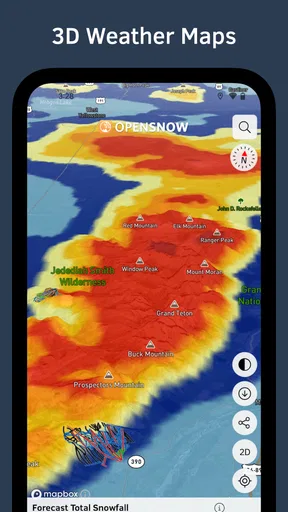
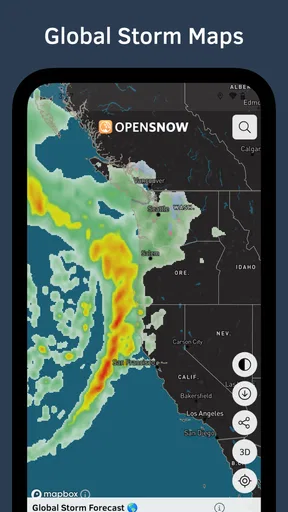
OpenSnow is a comprehensive weather app designed for snow enthusiasts. It provides detailed snow forecasts, live updates, and mountain-specific weather reports. With features like terrain maps, snowfall alerts, and expert analysis, it is a must-have for skiers and snowboarders looking to plan their trips with accurate and up-to-date information.
Is OpenSnow free to use, or does it require a subscription?
OpenSnow offers both free and subscription-based services. The free version provides basic weather forecasts and updates, while the premium subscription unlocks more detailed reports, extended forecasts, and customizable alerts. The subscription is ideal for users who need in-depth data and personalized features to enhance their outdoor adventures.
How accurate is the weather forecasting on OpenSnow?
OpenSnow is known for its high accuracy, thanks to a combination of meteorologist expertise and advanced weather models. The app's forecasts are tailored specifically for mountain conditions, offering precise predictions for snowfall, temperature, and wind. Users often praise its reliability compared to general weather apps, making it a trusted tool for planning snow activities.
Can OpenSnow be used internationally, or is it limited to specific regions?
OpenSnow primarily focuses on North American ski resorts but is expanding its coverage to include some international destinations. While the app is most beneficial for users in the United States and Canada, it is gradually adding more global locations. Users should check the app for specific region availability before planning their trips.
Does OpenSnow offer any community or social features for users?
OpenSnow includes community features that allow users to share reports and experiences. Skiers and snowboarders can upload photos, comment on conditions, and interact with fellow snow enthusiasts. This community aspect enhances the app's value, providing real-time insights and fostering a sense of connection among users.


